Key takeaways
- A real estate ERP runs the whole project: land, planning, procurement, construction, inventory, sales, collections and accounting. A CRM covers only the sales part.
- ERP vs CRM is not either-or for most developers. The ERP keeps money and operations under control; the CRM or sales layer moves buyers to a booking.
- RERA money rules push developers toward an ERP: 70 per cent of buyer receipts go to a separate project account, withdrawals follow completion, and the accounts are audited every year.
- Small developers with one project and an outside contractor can often start with a sales layer and accounting software.
- When you run both, agree which system owns the unit list, the price and the booking status. Most problems come from two systems disagreeing.
- Reveal by TalkingLands is a sales layer, not an ERP: live plot maps and 3D towers, pricing, buyer microsites, leads, site visits, bookings and reports.
ERP, CRM or both? Find what your team needs first
Pick one answer per question. The recommendation updates as you go.
Search for real estate ERP software and you get vendor lists that mix rental property-management tools, general business ERPs and broker back-office software, or CRM vendors explaining why a CRM wins. None of that tells an Indian developer what they need to decide: which system should run which part of the business.
This guide is a buyer’s view, from a team that sells a sales layer and not an ERP. It covers what a real estate ERP actually covers, how it differs from a CRM and a sales operating system, what RERA’s money rules mean for your software, and how developers run an ERP and a sales tool side by side without the two fighting over the same units.
What real estate ERP software is
ERP stands for enterprise resource planning. In a factory it ties purchasing, production, stock and accounts together. In real estate the “product” is a project that takes years, so a real estate ERP follows the project lifecycle instead:
- Land and feasibility: land cost, joint development terms, title and approval documents, and the project budget.
- Project planning: phases, towers or plot blocks, schedules and approvals.
- Procurement: purchase requests, purchase orders, vendor rates and bill matching.
- Construction: site progress, material use, contractor bills and cost against budget.
- Inventory: every unit or plot with its area, type and status.
- Sales and CRM: leads, bookings, cost sheets and agreements. In many ERPs this is a basic module.
- Collections: payment schedules linked to construction milestones, demand letters, receipts and interest.
- Accounting: ledgers, GST, multi-company books and project-wise profit.
- Possession: handover, snag lists and maintenance transfer.
The point of an ERP is that these share one database. Approve a vendor bill and the project cost moves; certify a milestone and demand letters go out. Without that link, finance rebuilds the picture every month from site reports, sales sheets and bank statements.
ERP vs CRM vs sales OS: module by module
The cleanest one-line split comes, oddly, from a CRM vendor: a CRM exists to move deals forward, an ERP exists to keep operations under control. A sales operating system is a third, newer category: it puts the project itself in front of the buyer and tracks how they explore it. Here is how the three usually compare. Individual products vary, so treat this as a map for your vendor questions, not a verdict on any tool.
| Module | Real estate ERP | Real estate CRM | Sales OS (Reveal) |
|---|---|---|---|
| Land and project costs | Core | No | No (land work sits in TalkingLands Realm) |
| Planning and approvals | Core | No | No; approvals can be shared as documents |
| Procurement and vendors | Core | No | No |
| Construction progress and cost | Core | No | No; site updates can be shown to buyers |
| Unit inventory and pricing | Core, often a static list | Often | Core: live status per plot or unit, rule-based pricing |
| Leads and follow-ups | Basic module in some | Core | Core: leads, engaged leads, Daily Priority view |
| Buyer-facing project view | Rare | Rare; usually PDFs | Core: plot maps on satellite imagery, 3D towers, one microsite per buyer |
| Site visits and bookings | Bookings | Core | Core: visits and bookings; booking amount from the same link, per the Reveal page |
| Collections and demand letters | Core | Some | No collections ledger |
| Accounting, GST, RERA project account | Core | No | No |
| Reports | Finance, cost, project | Sales pipeline | Inventory, revenue, bookings, cancellations |
Two rows matter most. Inventory appears in all three columns, which is exactly where developers get into trouble: if the ERP, the CRM and the site office each hold their own unit list, one of them is always wrong. The buyer-facing view appears only in the last column. ERPs and most CRMs are built for your staff; the buyer still gets a brochure and a price sheet on WhatsApp. Our guide to real estate CRM software covers the CRM modules in depth, so this post stays on the ERP decision.
RERA money rules and why they matter for software
RERA does not name any software. But two parts of the Real Estate (Regulation and Development) Act, 2016 shape what your systems must be able to produce:
- Section 4(2)(l)(D) asks the promoter to declare that 70 per cent of the amounts realised from allottees will be deposited in a separate account in a scheduled bank, to cover land and construction cost for that project. Money can be withdrawn only in proportion to the percentage of completion, certified by an engineer, an architect and a chartered accountant. The project accounts must be audited by a chartered accountant within six months of each financial year end.
- Section 11(1) asks the promoter to update the project page on the RERA website every quarter, including the number and types of apartments or plots booked.
Read those as a data requirement. A withdrawal certificate needs receipts, costs and progress per project for the same date; the quarterly update needs a booked count that matches the receipts. This is the strongest case for an ERP in Indian real estate: it is the place where receipts, costs and progress meet. A sales tool helps the second rule by keeping the booked count honest, but it does not keep the books.
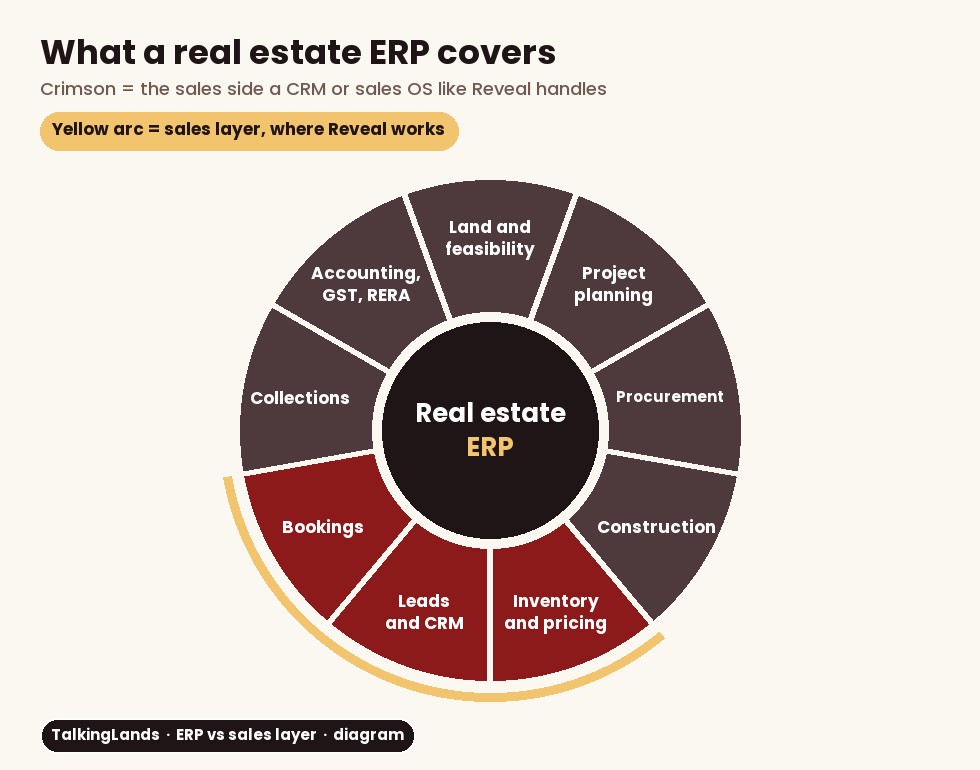
What a real estate ERP covers. The crimson segments (inventory and pricing, leads and CRM, bookings) are the sales side, where a CRM or a sales OS like Reveal works.
When a developer needs each
The honest answer depends on where your money leaks today.
Start with a CRM or sales layer when you run one or two projects, a contractor or joint development partner builds, your accountant keeps the books in standard accounting software, and the main loss is on the sales side: slow follow-ups, cold leads, quotes that do not match inventory.
Start with an ERP when you run several projects or several companies, construction is in-house, vendor bills and cost overruns are hard to track, and month-end, GST and RERA certificates take your finance team weeks of reconciliation.
Run both when you are big enough for the ERP case and still lose buyers between the enquiry and the site visit. This is where most mid-size and large developers land. The ERP is the system of record for money; the sales layer is the system of engagement for buyers.
The real estate sales software guide walks through the sales-side options if that is where you start.
How to run an ERP with a sales layer
Teams that run both well settle four questions before the first integration call:
- Who owns the unit master? One system holds the list of units, areas and types. The other reads it. Changes are made in one place only.
- Who owns the price? If pricing rules live in the sales layer (facing, floor, corner, phase), the ERP should receive the final cost sheet, not recalculate it.
- Where does a booking become a receivable? Usually the booking is made in the sales tool and the ERP raises the payment schedule and demand letters from it.
- How does status flow back? When the ERP records a cancellation or a full payment, the unit status in the sales layer has to change the same day, or a sold unit goes back on sale.
Ask every vendor whether this is a standard connector, an export and import, or custom work, and get it in writing. Lead handling is a separate topic; our real estate lead management guide covers capture, priority and follow-up rules.
10-point real estate ERP evaluation checklist
Use this in every ERP demo. Ask the vendor to show each item live with your own project data, not on a slide.
- Project lifecycle fit: does it follow land, planning, construction, sales, collections and possession, or is it a general ERP you must configure?
- Multi-project, multi-company books: can it keep separate books for each SPV or partner company and still consolidate?
- RERA account support: can it split receipts into the project account and produce the data your engineer, architect and CA certify?
- Milestone-linked collections: do demand letters go out automatically when a stage is certified?
- Procurement controls: purchase requests, approvals, purchase orders and bill matching against budget.
- Construction cost tracking: budget vs actual per tower, phase or block.
- GST: ask how it handles the GST rules that apply to your project types.
- Inventory ownership: can it read the unit list from your sales tool, or push it, without double entry?
- Implementation plan: data migration, training and go-live dates. One ERP implementer estimates 3 to 6 months for smaller projects and 9 to 18 months or more for complex rollouts.
- Total cost: licences, implementation, customisation, support and the cost of the people who will run it.
Where Reveal fits
Reveal by TalkingLands sits in the crimson part of the wheel. It is the sales operating system for developers: the part buyers and sales executives touch every day. Buyers open one link and explore plots on satellite imagery or 3D towers floor by floor; in the console, units, pricing rules, leads, site visits, bookings and reports sit together, and the executive sees which leads engaged before calling.
What it does not do is the back office. Reveal does not keep ledgers, GST books, purchase orders or construction budgets. If you need those, run Reveal alongside your ERP or accounting software and agree, as above, which system owns units, prices and bookings. TalkingLands says a project can go live on Reveal within a day, which is very different from an ERP timeline, so some developers fix the sales side first while an ERP project runs in parallel.
- Book a demo on the Reveal demo page.
- Share your layout and inventory: the site boundary, the unit list and your price sheet.
- Agree the handoff with your ERP or accounts team: which system owns units, prices and bookings.
- Send microsite links to a few real leads and watch engagement, visits and bookings in the console.
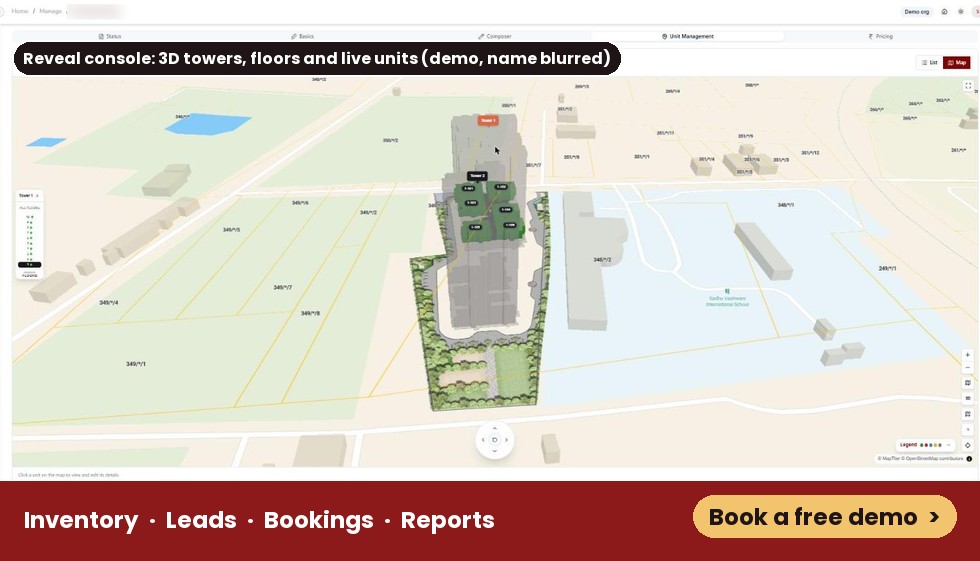
Reveal’s Unit Management map in a demo account: towers on the real site, a floor selector and units by status. The project name is blurred.
Common mistakes
Put the sales side live while your ERP decision runs
Plot maps, 3D towers, pricing, leads, bookings and reports in one console. Share your layout and see it running.
Book a free demoFrequently asked questions
It is software that runs a developer's back office in one place: project costs, procurement, construction progress, inventory, bookings, receipts, GST and the accounts behind RERA reporting. Some ERPs include a basic CRM.
An ERP keeps operations and money under control: costs, vendors, construction, collections and accounts. A CRM moves the sale forward: enquiries, follow-ups, site visits and bookings. The two overlap at inventory and bookings, which is why the unit list has to live in one agreed system.
Not always. A developer with one or two projects, an outside contractor and a good accountant can often start with a CRM or sales layer and accounting software. Once you run several projects, several companies or construction in-house, an ERP usually earns its cost, and the sales layer sits in front of it.
No. A CRM does not handle purchase orders, vendor bills, construction budgets, GST books or the audited project account RERA asks for. Some CRMs add collections or payment reminders, but the ledger still has to live in accounting software or an ERP.
RERA Section 4(2)(l)(D) asks promoters to deposit 70 per cent of buyer receipts in a separate project account and withdraw only in proportion to completion, with certificates from an engineer, architect and chartered accountant and a yearly audit. An ERP that tracks receipts, costs and progress per project makes those certificates and the quarterly updates far easier to prepare.
No. Reveal is a sales operating system for developers: live plot maps and 3D towers, inventory and pricing, a microsite link per buyer, leads, site visits, bookings and reports. It does not do accounting, procurement or construction management, so developers who need those run it alongside accounting software or an ERP.
This article explains how real estate ERP software differs from CRM and sales software for developers. ERP module descriptions are general and individual products vary. Reveal details come from the TalkingLands Reveal page (read on 10 November 2026) and our walkthrough of a Reveal demo account on 5 November 2026; features can change, so confirm them in a demo. Implementation timelines quoted are one vendor’s estimate. The RERA summary is general information, not legal or tax advice.